
Old home videos and photo albums hold priceless memories, but converting them into digital format raises an important concern. Many people hesitate before placing an order because they worry about hidden fees or automatic subscriptions. That is why the question, “Do you have to pay monthly for iMemories?” is so common among families looking to preserve their past safely and affordably.
The short answer is no, you do not have to pay monthly for iMemories unless you choose extended cloud storage after digitization. The core service is a one time payment for converting your tapes, films, or photos. Keep reading to understand exactly how pricing, storage, and subscriptions really work.
Do You Have to Pay Monthly for iMemories?
No, you do not have to pay monthly for iMemories. iMemories charges a one-time digitization fee per item (such as tapes, film reels, or photos). Monthly payments only apply if you choose to continue using their cloud storage after the free access period. A recurring subscription is not required to use the service.
Now, let’s examine the pricing structure in detail so there is no confusion.
iMemories Pricing Structure Explained
iMemories operates primarily as a pay-per-item digitization service, not as a subscription platform. The core cost depends on how many physical media items you send for conversion.
You are paying for:
- Professional digitization
- Secure handling and processing
- Digital delivery of your memories
You are not automatically enrolled in a monthly membership.
One-Time Digitization Fees
The main cost is charged per media item. This is a flat, one-time payment.
Video Tapes
This includes formats such as:
- VHS
- MiniDV
- Hi8
- Camcorder tapes
Each tape is typically billed individually. The pricing does not depend on streaming access or subscription length; it is based solely on digitization.
Photos and Slides
Printed photos, 35mm slides, and negatives are generally priced:
- Per photo, or
- In discounted bulk bundles
Larger collections often reduce the average cost per item.
Film Reels
For 8mm, Super 8, and 16mm film reels, pricing is usually based on length (measured in feet). Longer reels cost more due to processing time and restoration needs.
Bulk Discounts and Promotional Offers
iMemories frequently offers:
- Volume-based pricing reductions
- Seasonal discounts
- Promotional campaigns
These offers can significantly lower your total conversion cost, especially for large memory collections.
SafeShip Kit and Handling
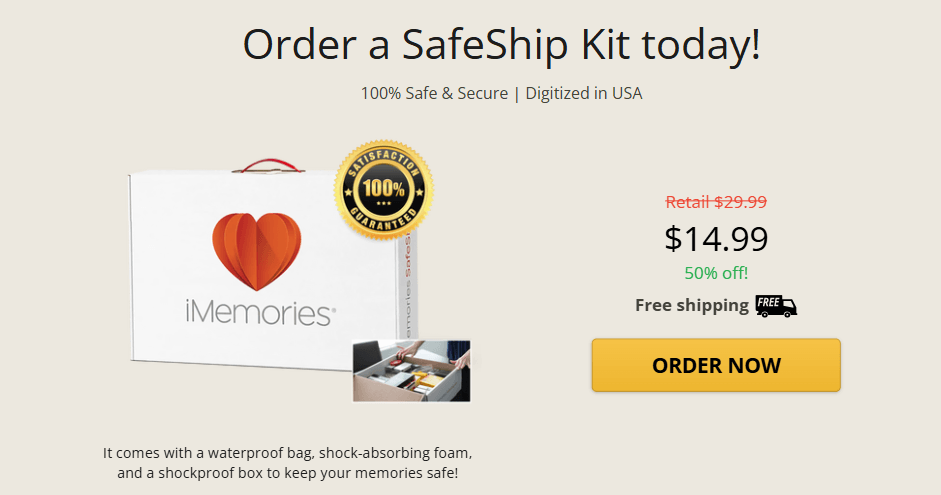
When you begin the process, iMemories sends a SafeShip Kit. This typically includes:
- Crush-resistant packaging
- Prepaid shipping label
- Order tracking
- Secure return handling
Shipping costs may be included in promotional deals, but this can vary depending on the offer available at the time of purchase.
Optional Add-Ons (Not Mandatory)
Beyond digitization, customers may choose optional upgrades, such as:
- USB flash drive copies
- DVD copies
- Additional duplicate sets
- Extended cloud storage plans
These features are entirely optional. You only pay for the extras you select.
When Monthly Fees Apply
The only situation where a recurring fee may apply is related to cloud storage access.
After your items are digitized, they are uploaded to a secure online account. Customers typically receive a free cloud storage period that allows them to:
- Stream their digitized videos
- Download files
- Share access with family members
Once that complimentary period ends, users can choose whether to continue storing their files online.
Continuing Cloud Storage
If you want:
- Long-term online backup
- Easy remote access
- Ongoing sharing features
- Secure digital storage in the cloud
You may opt into a monthly cloud storage plan. This is a voluntary choice, not a mandatory subscription.
Avoiding Monthly Payments
If you prefer not to pay ongoing fees, you can:
- Download your digitized files
- Save them to your computer
- Store them on an external hard drive
- Back them up to your own cloud service
In this case, no further payments are required. You retain access to your physical originals, which are returned after digitization.
The Way Recurring Billing Works
Monthly billing for storage does not begin without customer awareness. Before the free storage period ends:
- Notifications are typically sent
- Upgrade options are presented
- Customers decide whether to continue
There is no hidden enrollment in a subscription plan tied to the digitization order itself. In reality, digitization and cloud storage are structured as separate cost components.
What Happens After Free Cloud Storage Ends
If you choose not to continue cloud access:
- Your digitized files remain available if downloaded
- Your physical media has already been returned
- Cloud streaming access may expire
There are no penalties for declining continued storage.
Clear Pricing Summary
To simplify everything:
| Cost Type | Required | Payment Frequency |
| Digitization Fee | Yes | One-time |
| SafeShip Kit | Usually Included | One-time |
| USB / DVD Copies | Optional | One-time |
| Extended Cloud Storage | Optional | Monthly |
You do not have to pay monthly unless you choose to keep using cloud storage after the free period. For most customers who simply want their old tapes, films, or photos converted into digital files, iMemories remains a one-time service, not a required subscription.
How Does iMemories Actually Work? (Step-by-Step)
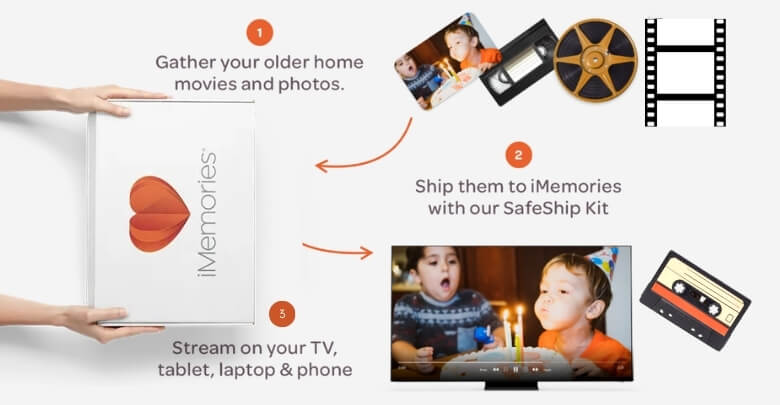
Using iMemories is designed to feel simple: you send in your old media, they digitize it professionally, and you get online access to watch, download, and share. Here’s the full process in a clear, step-by-step format, plus the trust details most people want before mailing irreplaceable memories.
Step 1: Choose What You Want to Digitize
Start by gathering the items you want converted. iMemories accepts a wide range of formats, including:
- Video tapes (like VHS and MiniDV)
- Film reels (8mm, Super 8, 16mm)
- Photos
- Slides (and commonly negatives as well)
This step is also where you estimate how many items you have, which helps you understand pricing and turnaround expectations.
Step 2: Order Your SafeShip Kit
You place an order, and iMemories sends you a SafeShip Kit to pack your memories securely. The kit is described as including protective packaging such as a crush-proof box and waterproof bags, and it’s meant to make shipping safer and easier.
Why this reduces friction: You don’t need special packing knowledge; just put your items in the kit and ship.
Step 3: Pack Your Media and Send It In
You pack your tapes, reels, photos, and slides and ship them to iMemories.
A key convenience detail from iMemories: you don’t have to label or organize everything perfectly to get started; they position the process as “pack and send.”
Step 4: Professional Digitization (They Do the Hands-On Work)
Once your box arrives, their team digitizes your media, converting analog formats into digital files. They also market optional quality improvements (like upscaling/enhancement) as part of the experience, depending on what you select.
What this means for you: You’re not buying a tool or doing a DIY conversion; you’re paying for a done-for-you service.
Step 5: Your Files Are Uploaded to Your Private iMemories Account
After digitization, your videos and photos are uploaded to your iMemories account so you can:
- Stream your videos
- View photos digitally
- Share with family
- Download files for personal backup
They also publish a general timing expectation for when content becomes available online (commonly referenced around a couple of weeks after order approval/payment, with expedited options available).
Step 6: Your Originals Are Shipped Back to You
After the conversion is complete, iMemories states that originals are shipped back to customers. It is assured that after processing, time is allowed for originals to return, and advises not to include unrelated personal artifacts.
This is an important reassurance: you’re not “trading in” memories, you’re converting them and getting the originals back. Moreover, this return process is also a key reason many readers question iMemories’ legitimacy, especially when mailing irreplaceable tapes and photos.
When Would You Need to Pay Monthly?
Most people don’t need to pay monthly for iMemories. A recurring fee only applies if you decide to continue using their cloud storage after the free access period ends. You only pay monthly if you choose extended cloud storage. If you download your digitized files and store them yourself, no recurring payment is required.
Scenario 1: One-Time Digitization Users (No Monthly Needed)
If you:
- Pay the one-time digitization fee
- Download your videos and photos
- Store them on your own device or drive
You do not need a subscription. This is the most common user path.
Scenario 2: Long-Term Cloud Storage Users
Monthly fees apply if you want:
- Ongoing online access
- Streaming anytime from any device
- Secure cloud backup
- No need to manage local storage
In this case, you’re paying for storage, not digitization.
Scenario 3: Families Who Share Frequently
Recurring storage may make sense if:
- You regularly share memories with relatives
- You prefer streaming over downloading
- You want centralized family access
Again, this is optional.
What Happens If You Cancel
If you cancel cloud storage:
- Monthly billing stops
- Online access may expire
- Downloaded files remain yours
- Originals have already been returned
There are no penalties for cancellation.
Download & Data Retention
Before the free storage period ends, you can:
- Download full-resolution files
- Back them up locally
- Move them to another cloud service
If you don’t continue storage, access may expire, so downloading is important. Also, if you want to estimate your total cost before ordering, check the iMemories pricing details to see how per-item rates and add-ons work.
iMemories Free Storage: What’s Included?
When your media is digitized, iMemories uploads your digital files so you can access them before choosing any optional subscription. Here’s what free storage includes based on the official offer information.
- Free Digital Downloads Included: After digitization is complete, you can download all your digital masters for free, keeping the files on your own devices without a subscription.
- Access to iMemories App Streaming: You can stream and enjoy your digitized memories in the iMemories app, which lets you watch your videos and view photos on connected devices.
- Viewing on Multiple Devices: Once uploaded, your memories can be streamed or viewed on TVs, tablets, laptops, and phones through the app and cloud access provided with your order.
- Sharing Capabilities Available: During the access period, the iMemories platform typically allows sharing via the app, enabling family and friends to enjoy memories on their own devices.
- Cloud Access Before Subscription Begins: The online viewing and sharing functions are available before any iMemories Cloud subscription is activated, so free access precedes the paid plan.
- Optional iMemories Cloud Subscription: If you choose to continue storage and unlimited streaming, the iMemories Cloud plan is offered at a monthly or annual price, but this is not required to download your files.
Comparing iMemories to Other Digitization Services
Choosing a VHS-to-digital service is not just about price. It is also about how clear the costs are, whether a subscription is required, how fast you get results, and how safely your original media is handled. Below is a straightforward comparison.
| Option | Price transparency | Typical cost style | Subscription requirement | Turnaround time | Media safety & risk |
| iMemories (mail-in) | High (clear add-ons) | Per item | Not required (optional cloud) | Usually predictable | Strong tracking/handling process, shipping required |
| Local digitization shop | Medium (varies by shop) | Per item or per hour | No | Varies by workload | No shipping, but quality varies by equipment |
| Big-box retailer | Medium to low (often outsourced) | Package based | No | Varies, sometimes slower | Drop-off convenience, but third-party handling is common |
| Subscription-based services | Medium | Monthly plan plus extras | Yes (for ongoing access) | Fast for software services | Digital-first, but not ideal for physical media conversion |
| DIY conversion kits | High (you control spending) | Upfront gear cost | No | Depends on your time | The highest risk of errors, quality depends on the hardware/setup |
If you want the most balanced option overall, iMemories is usually the best pick because it combines clear per-item pricing, professional digitization, optional cloud storage for old videos, and a simple mail-in process that works no matter where you live.
Pros and Cons of iMemories Payment Structure
Before deciding whether the pricing model works for you, it helps to look at both sides objectively. A balanced evaluation builds trust and helps you understand where iMemories fits compared to other video digitization pricing options.
Pros
- No Mandatory Subscription: You can use iMemories as a one-time digitization service without being automatically enrolled in recurring monthly billing.
- Pay Per Item Pricing: Costs are generally calculated per tape, film reel, or photo batch, which makes budgeting more predictable for most customers.
- Optional Cloud Storage: Extended cloud storage for old videos is available but not required, and you can download your files to avoid ongoing payments.
- Nationwide Mail-In Service: The process works across the country, removing the need to rely on local shops with varying pricing and service quality.
Cons
- Costs Can Increase With Large Collections: Because pricing is typically per item, converting many tapes or reels can become expensive.
- Shipping and Processing Time: Mail-in digitization involves shipping and handling time, which may be longer than immediate local drop-off options.
Overall, the payment structure is flexible and transparent, but the best value depends on how many items you are converting and whether you need long-term cloud access.
Frequently Asked Questions About iMemories
Before choosing a media digitization service, many users search for additional details beyond pricing and storage. Below are commonly searched questions related to iMemories that help clarify process expectations, quality, timelines, and service policies.
How Long Does iMemories Take to Digitize Tapes?
Turnaround time typically depends on order volume and season. Standard processing can take a few weeks from the time your media is received. Expedited options may be available at an additional cost, depending on demand.
What Types of Tapes and Formats Does Imemories Accept?
iMemories commonly accepts VHS, MiniDV, Hi8, Betamax, 8mm film reels, Super 8, 16mm film, printed photos, slides, and negatives. Format acceptance may vary, so checking the official format list before shipping is recommended.
Do Imemories Improve Video Quality During Digitization?
Digitization converts analog footage into digital format, and some enhancement or stabilization features may be applied. However, the final quality largely depends on the condition of the original tape or film.
Can Damaged or Old Tapes Still Be Digitized?
In many cases, older or slightly damaged tapes can still be processed. Severely damaged media may require special handling, and results can vary depending on tape condition and playback viability.
How Can I Track My Imemories Order?
Once your package is shipped, tracking information is typically provided. Customers usually receive notifications when media is received and when digitization is completed, helping monitor the process step by step.
Is There a Minimum Number of Items Required to Place an Order?
iMemories generally does not require a large minimum order. Customers can send a single tape or multiple items, though promotional pricing may apply to larger batches.
Does Imemories Offer Refunds?
Refund eligibility depends on the stage of processing. Because digitization is a service, refund policies may vary once work has begun, so reviewing the official terms before ordering is advisable.
Is Imemories Worth It Compared to Doing It Yourself?
For many users, the convenience, professional handling, and reduced risk of equipment errors make iMemories worthwhile. DIY methods may cost less upfront but require technical setup and time investment.
Conclusion
By now, you should clearly understand the answer to do you have to pay monthly for iMemories. The service mainly charges a one-time digitization fee, while monthly payments apply only if you decide to continue cloud storage access.
For most users, downloading their files means no recurring costs at all. Understanding the pricing structure helps you make a confident decision about preserving your memories. Take the time to review your storage needs and choose the option that works best for you.