
Old VHS tapes and fading photos hold moments you can’t recreate. That’s why many people search is iMemories app free before trusting a company with their memories. Cost transparency matters when you’re mailing priceless family history for digitization and storage.
The simple answer is this: the app is free to download, but digitization and long-term cloud storage are paid services. Understanding where charges begin helps you avoid surprises. Keep reading to see what’s truly free and when payment applies.
Is iMemories App Free? (Where the Costs Actually Begin)
The short answer is yes, the iMemories app is free to download. However, the digitization service and long-term cloud storage are paid for. That answer sounds simple, but whether the app is truly “free” depends on how you define free.
When people search “Is iMemories app free?”, they are usually asking one of these deeper questions:
- Is the download free?
- Can I use it without entering payment details?
- Are there hidden subscription charges?
- Do I need to pay monthly?
- Can I use the app without paying for digitization?
- Will I lose access if I cancel?
To properly answer the question, we need to separate the five different layers of cost.
App Download Is Free
Yes. Installing the iMemories app from the App Store or Google Play does not cost anything. You can:
- Download the app
- Create an account
- Log in
- Explore the dashboard
There is no upfront payment required just to install or register. If your definition of “free” means “no cost to download”, then the app qualifies as free. But that’s only the first layer.
Account Creation Is Free
Yes, signing up for an account is also free. You can:
- Create a profile
- Track orders
- Manage your account
- Receive updates
You are not automatically enrolled in a paid plan just for creating an account. This is important because many users worry about automatic billing at signup. That does not happen at the registration stage.
The Core Service Is Not Free
No, and this is where the cost begins. iMemories is primarily a media digitization company, not just a mobile app. The main service involves converting:
- VHS tapes
- Camcorder tapes
- 8mm and Super 8 film reels
- Printed photos
- Slides and negatives
This process requires:
- Specialized playback and scanning equipment
- Professional handling and restoration
- Digital processing
- Quality control
- Secure data management
Because this involves physical labor and professional equipment, it is not free. You pay per item sent for conversion. If your definition of “free app” includes full service access without payment, then iMemories is not free.
Cloud Storage Is Not Free Long-term
This is where confusion increases. After your items are digitized, they are stored in the iMemories cloud so you can:
- Stream videos
- View photos
- Share links with family
- Access content from any device
Typically, there is a limited free trial period for cloud access. After that period ends, continued online streaming and storage require a paid subscription (monthly or annual).
So:
- Short-term access → Often included
- Long-term cloud access → Paid
If you only want temporary access, it may feel free initially. If you want permanent streaming access, it becomes a subscription service.
One-time Fees and Ongoing Fees Are Separate
To determine whether something is “free,” you must separate two types of charges:
One-Time Fees
- Digitization per tape, film reel, or photo
- Optional USB or DVD copies
- Shipping kit (if applicable)
These are project-based charges. You pay once for the conversion.
Ongoing Fees
- Monthly cloud storage
- Annual cloud subscription
These apply only if you choose to keep online access active after any trial period. Understanding this distinction is critical. Many users assume downloading the app means automatic recurring charges, but that only happens if you opt into ongoing cloud storage.
iMemories Can Be Used Without Paying Long-term (With Limits)
Yes, but with limitations. Here’s how:
- Pay for digitization
- Download your digital files
- Save them to your own device or hard drive
- Cancel the cloud subscription
If you do this, you avoid long-term recurring fees. However, if you want ongoing streaming access and sharing convenience through the app, you’ll need to maintain the cloud plan. So the app can be free to download, but full long-term convenience is not free.
“Free” Depends on What You Mean
When evaluating whether iMemories is free, consider:
| Layer | Free or Paid? |
| App download | Free |
| Account creation | Free |
| Order tracking | Free |
| Digitization service | Paid |
| USB/DVD add-ons | Paid |
| Cloud storage after trial | Paid |
The confusion happens because the app itself is free, but the company’s core offering is a paid professional service.
If your main concern is whether you can download iMemories without paying, yes, you can install the app and create an account for free. But digitizing tapes or photos isn’t free, and you’ll only pay monthly if you keep cloud storage after any trial period. There are no hidden charges just for installing the app; costs start when you use the paid digitization service or continue cloud access long-term.
What You Can Use Without Paying a Dime?
By now, you know the app itself doesn’t cost anything to install. But what does that actually allow you to do before spending money? While iMemories is ultimately a paid digitization service, the app gives you limited but useful functionality at no cost.
Explore the Platform and Set Up Your Account
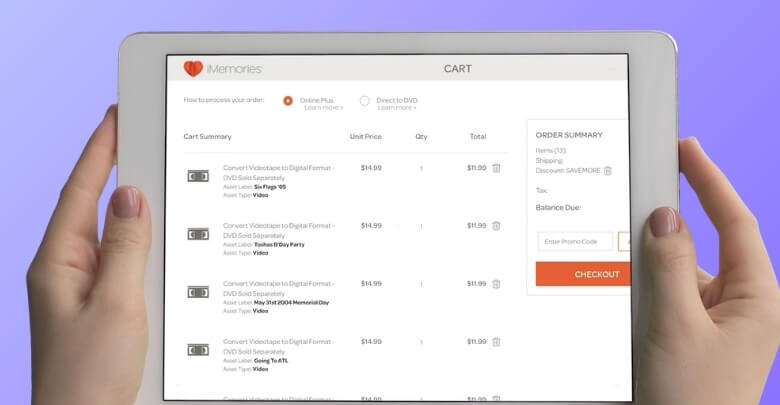
You can download the app, create an account, and familiarize yourself with the dashboard. This allows you to understand how the system works, see how media will be organized, and get comfortable with the interface before committing to a conversion order.
There’s no obligation to place an order just because you signed up.
Access Trial Cloud Features (If Available)
New users are often given temporary access to cloud features once their items are digitized. During that period, you can:
- Stream converted videos
- View scanned photos
- Test sharing options with family members
- Explore playback quality and mobile accessibility
This gives you a realistic preview of what long-term cloud storage offers — without an immediate subscription commitment.
Track Orders and Monitor Progress
Even if you don’t subscribe to ongoing cloud storage, the app remains useful for order management. You can:
- Track your shipment status
- Receive notifications about processing stages
- Monitor when digitization is complete
- Manage account details
For many users, features like order tracking and progress updates also reflect the reliability of the iMemories app, especially when you’re mailing irreplaceable originals. These tools are part of the service transparency and remain accessible regardless of whether you maintain a paid cloud plan.
In short, while you can’t digitize media for free, you can explore the system, manage your order, and temporarily experience cloud features without paying upfront. The paid portion begins when you choose professional conversion or continue online storage beyond any included trial.
Free Download Doesn’t Mean Free Service – Here’s Why
The iMemories app is free because it functions like a viewer and organizer for your digitized memories. But the part people actually want, turning old tapes, film, slides, and photos into digital files, requires a real production workflow, not just software.
Digitization Is a Physical Process, Not an App Feature
When you digitize a VHS tape or film reel, it isn’t “uploaded” like a phone video. Your media has to be received, handled, processed, and converted using specialized systems that are built for old formats. That typically includes:
- Format-specific playback and scanning equipment
- Color correction or enhancement tools (when needed)
- Manual handling of fragile media
- Quality checks to ensure the transfer is usable
- Secure processing and storage while work is completed
This is why iMemories charges per item, because the workload scales with how much you send in.
Cloud Access Costs Money to Maintain Over Time
After digitization, the app becomes your access point for streaming and sharing. But keeping files online long-term adds ongoing costs, such as:
- Storage space on secure servers
- Ongoing maintenance and backups
- Bandwidth for streaming videos
- Reliability features that keep files accessible across devices
That’s why cloud access usually starts with a limited trial and then moves to a paid plan if you want continued online streaming and storage.
The app is free because it’s the interface. The service isn’t free because it’s a hands-on conversion process, and the cloud isn’t free long-term because it has recurring infrastructure costs. Once you understand that, the pricing model becomes predictable—costs begin when you submit media for digitization and continue only if you choose to keep cloud storage active.
One-Time Fees vs Ongoing Charges: What’s the Difference?
One of the most important parts of understanding whether iMemories is “free” is separating one-time fees from recurring costs.
One-Time Fees
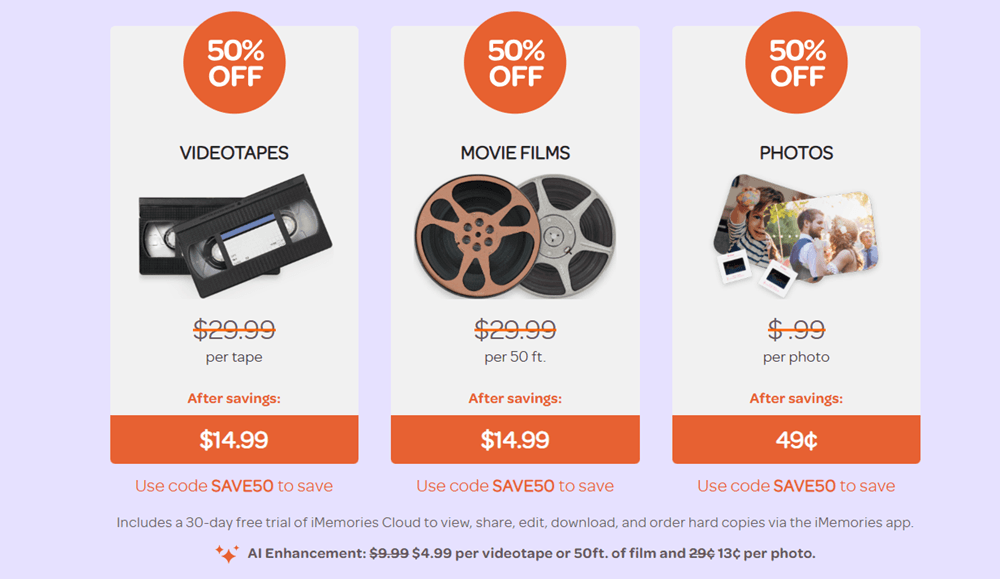
These are charged for digitizing physical media. You pay only for what you send. Typical pricing structure includes:
- Per videotape (e.g., VHS, MiniDV)
- Per 50 feet of film reel
- Per photo scan
- Optional USB or DVD copies
- SafeShip kit for secure mailing
This model means you are not locked into a bulk package. If you send five tapes, you pay for five tapes, nothing more.
These are conversion fees, not subscription fees.
Ongoing Charges (Cloud Subscription)
After digitization, your content is stored in the iMemories cloud. Following the free trial period, continued streaming and online access require a subscription. These iMemories subscription requirements mainly apply if you want ongoing cloud storage and streaming after the trial, not just the one-time digitization. Common options include:
- Monthly cloud plan
- Annual cloud plan (usually discounted compared to monthly billing)
The subscription allows:
- Unlimited streaming
- Family sharing
- Mobile access anytime
- Long-term online storage
Importantly, the cloud plan is separate from the digitization fee. You can pay once for conversion and later decide whether to maintain cloud access. This flexibility is often overlooked in quick pricing summaries.
A Simple Cost Breakdown in Real-life Scenarios
iMemories pricing is easiest to understand with real totals. Below are simple, real-life cost scenarios showing how per-item digitization fees and optional cloud storage can add up, so you can estimate your iMemories cost before ordering.
Scenario 1: Small Family Project
You send:
- 5 VHS tapes
- No USB add-on
- Choose monthly cloud storage
Estimated cost structure:
- 5 tapes × per-tape price
- SafeShip kit
- Monthly cloud fee
This type of order often stays under a few hundred dollars total, depending on the add-ons selected.
Scenario 2: Medium Archive
You send:
- 10 videotapes
- 100 photos
- Annual cloud plan
- USB backup
Now your total includes:
- 10 per-tape charges
- Photo scan fees
- USB add-on
- Annual subscription
Choosing annual cloud instead of monthly reduces long-term cost if you plan to keep streaming access for a full year.
Scenario 3: Large Legacy Collection
You send:
- 20+ tapes
- Multiple film reels
- Hundreds of photos
- Multiple USB copies
This becomes a larger investment but is still structured per item rather than a fixed premium package.
These scenarios highlight something important. The app itself remains free; your cost depends entirely on how much media you digitize and whether you keep cloud storage.
What Happens If You Cancel the Cloud Plan?
This is one of the most searched follow-up questions after “Is iMemories app free?” If you cancel the cloud subscription:
- You lose streaming access through the app
- You can no longer access files stored online
- Sharing features are disabled
However, if you downloaded your files locally or purchased a USB copy, those remain yours permanently.
This means cloud storage is optional long-term. It’s a convenience feature, not a permanent requirement.
Many users subscribe temporarily:
- Digitize memories
- Download everything
- Share with family
- Cancel subscription
This approach minimizes ongoing expenses while preserving digital copies. Always check cancellation instructions inside your account dashboard or app store billing settings to ensure proper termination before renewal.
When Does Paying for iMemories Actually Make Sense?
Paying for iMemories makes the most sense when you need professional digitization plus easy streaming, sharing, and backup. If you’re converting many tapes, film reels, or photos, the service can save time and protect memories with reliable access.
It makes sense if:
- Large collections need organizing
- Streaming across devices matters
- Sharing is a priority
- Cloud backup is worth it
It may not be necessary if:
- USB delivery is enough
- You want everything stored locally
- You prefer DIY file management
The value depends on your priorities, like convenience vs cost control, streaming access vs one-time conversion, and ongoing sharing vs permanent offline backup. So, the service is not free, but it is flexible.
Frequently Asked Questions (FAQs)
Before deciding whether iMemories is worth using, many users search for additional details about safety, turnaround time, refunds, and file ownership. Below are common People Also Ask–style questions that clarify concerns not fully covered above.
Is iMemories Safe to Send My Original Tapes and Photos?
iMemories uses tracked shipping kits and monitored processing facilities. While no mailing service is risk-free, the company promotes secure handling, order tracking, and protective packaging during transit and digitization.
How Long Does iMemories Take to Digitize Media?
Turnaround time typically depends on order size and seasonal demand. Smaller orders may take a few weeks, while larger projects can take longer due to processing volume and quality checks.
Does Imemories Improve Video Quality?
The service may apply basic enhancements like color correction or stabilization when possible. However, it cannot fully restore severely damaged or degraded footage beyond the limits of the original media.
Can I Download My Digitized Videos to My Computer?
Yes. After digitization, users can download digital files through cloud access. Saving files locally allows you to keep copies even if you later cancel cloud storage.
Does iMemories Return My Original Media?
Yes. After digitization is complete, original tapes, film reels, and photos are typically returned along with any physical add-ons you selected.
Is There a Refund Policy If I Change My Mind?
Refund eligibility depends on the processing stage of your order. Once digitization work has started, partial or full refunds may be limited according to company policy.
Can I Share My Digitized Memories With Family Members?
Yes. Cloud access allows users to share private links with family and friends, making it easy to stream videos or view photos across devices.
Conclusion
So, is iMemories app free? Yes, the app itself is free to install and explore. However, the professional digitization service and continued cloud storage require payment after any trial period ends.
Understanding the difference between free access and paid services helps you make a confident decision. If you want secure digitization and easy sharing, it may be worth the investment. Review your needs carefully before placing an order.